KW Command CRM Overview for Real Estate Agents

Managing leads, listings, communication, and marketing has become increasingly complex for real estate professionals.
To help streamline these workflows, Keller Williams developed KW Command, an all-in-one real estate platform built to centralize an agent’s entire business.
Often referred to as Command KW, Keller Williams Command, or simply Keller Command, the system combines a CRM, marketing hub, transaction tracker, reporting dashboard, and mobile app into a single environment.
More than 140,000 agents currently use it to organize contacts, nurture leads, automate SmartPlans, and track deals from first conversation to closing.
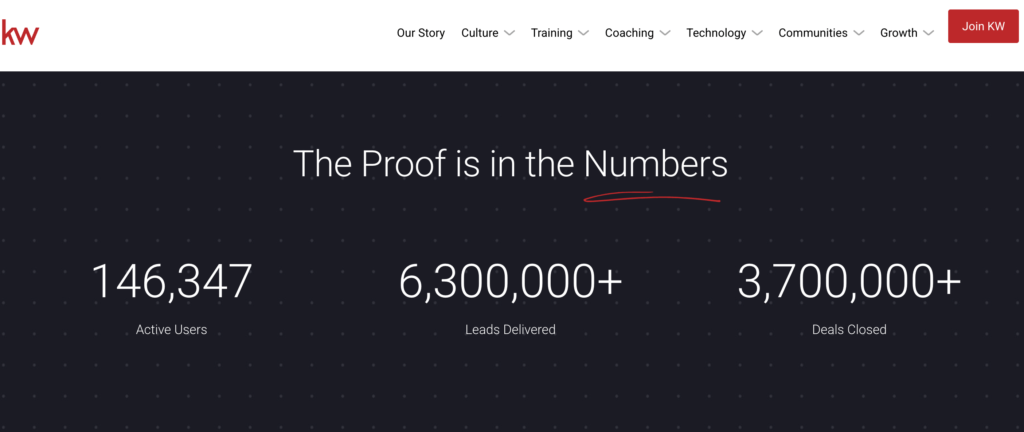
For Keller Williams agents, Command serves as the backbone of daily operations. It replaces the need for multiple third-party tools, bringing marketing campaigns, pipeline management, and client communication under one roof.
But like any platform, it comes with both strengths and limitations, and understanding how it works is essential for deciding how much of your business should run through it.
The following sections break down what KW Command does, how agents use it, where it excels, and where additional tools or customization may be necessary.
What Is KW Command?
KW Command (often called Command KW, Keller Command, or the Keller Williams CRM) is Keller Williams’ proprietary real estate business platform. Built by agents and data scientists, Command is designed to centralize every major workflow a real estate professional manages: lead generation, follow-up, transactions, marketing, and client communication.
Instead of juggling multiple tools for email marketing, pipeline tracking, social ads, and CRM tasks, Command brings them into one integrated system.
For Keller Williams agents, this means your contacts, listings, SmartPlans, documents, and communication are all tied together within the same platform, reducing friction and creating a single source of truth for your business.
Why Keller Williams Created Command
Keller Williams built Command because the typical agent workflow had become overly fragmented. Agents were using a patchwork of tools, like:
- A separate CRM
- Spreadsheets
- Facebook Ads Manager
- MailChimp or another email tool
- Paper or PDF checklists
- Standalone transaction management systems
Command consolidates these into one end-to-end solution, with a focus on:
- Lead to close efficiency
- Automation
- Predictive insights
- Cost savings vs. third-party CRMs
Keller Williams frequently highlights that many competing CRMs cost $300–$1,000 per month once you add advertising tools, marketing features, and integrations. Command aims to replace most of those costs for KW agents.
What KW Command Includes
At its core, KW Command provides:
- A full CRM for contact and lead management
- SmartPlans for automated follow-up and drip campaigns
- Opportunity pipelines for tracking deals
- Campaigns for social ads, email marketing, and direct mail
- Listings management tied to KW’s global listing network
- Reporting, forecasting, and goal tracking
- A mobile app (Command App) for running your business on the go
- The KW Consumer App, which connects clients directly to your Command ecosystem
This makes it both a productivity platform and a client engagement system, tying client actions (saved searches, viewed homes, collections, etc.) directly to your backend Command dashboard.
Who KW Command Is Designed For
KW Command is exclusively for Keller Williams agents, teams, and market centers. It supports:
- Solo agents
- Mega teams
- Rainmakers and lead gen–focused teams
- Admins and transaction coordinators
- Market center leadership
Because Command is part of the overall Keller Williams ecosystem, it integrates with the broader KW network, including referrals, listings, training, and global expansion.
How KW Command Fits Into the Keller Williams Tech Strategy
Keller Williams frequently describes itself as a technology company that happens to be in real estate.
Command is the centerpiece of this strategy, a platform that aims to:
- Reduce dependency on outside vendors
- Provide consistent tools across the KW network
- Offer agents more control over their data
- Deliver analytics that help predict lead behavior and guide follow-up timing
For new agents, Command functions as a ready-made business toolkit. For experienced agents, it can replace or consolidate many existing systems.
KW Command Login − How to Access Your Agent Account
Because “KW Command login,” “command KW login,” and “KW Command agent login” are among the most-searched queries, here’s a clear step-by-step guide to accessing the platform.
How to Log In to KW Command (Agent Login)
- Go to the official login page: console-dev.command.kw.com
(This is the fastest way to access KW Command.) - Enter your Keller Williams username and password.
Your Market Center usually provides these when onboarding. - Click Sign In.
- You’ll be taken directly to your KW Command dashboard.
If you forgot your login details, click “Forgot Password” and follow the reset steps via email.
How to Log In Using the KW Command App
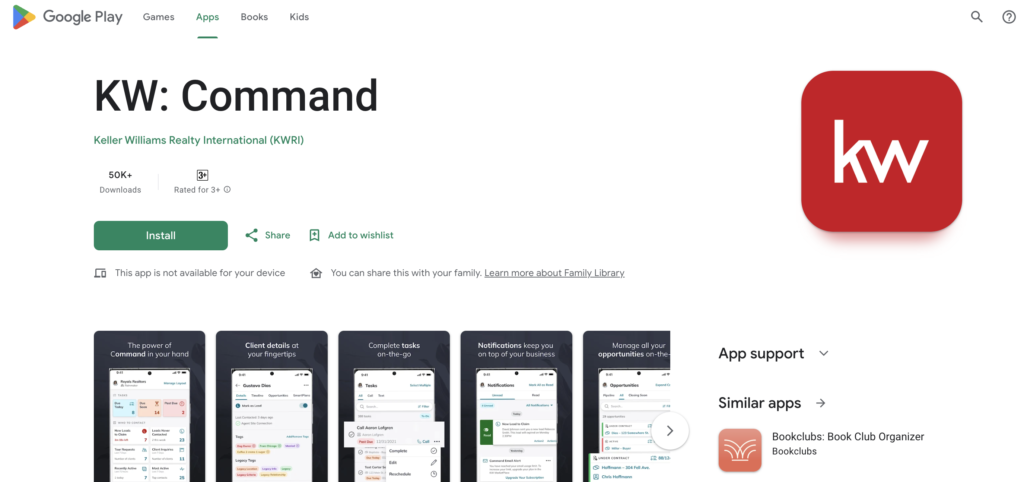
KW also offers a mobile companion app so you can manage leads and tasks on the go.
- Download KW Command App from the App Store or Google Play
- Open the app and enter your KW login credentials
- Access your contacts, SmartPlans, pipeline, tasks, and notifications on mobile
The app syncs instantly with your desktop Command account.
How to Change Your Password in KW Command
Many agents search for this, so here’s the quick method:
- Go to agent.kw.com
- Click “Forgot Password”
- Enter your KW email/username
- Check your inbox for a reset link
- Create a new password and log in again
Market Centers can also reset your password if you cannot access your email.
Troubleshooting Login Issues
If you can’t access command.kw:
- Make sure you’re using your KW-assigned username, not your personal email
- Clear browser cache or use an incognito window
- Check that your Market Center has activated your Command account
- Confirm your account hasn’t been locked for inactivity
- Contact KW Support via the Command help concierge inside the platform
If you run into any issues or need additional guidance, visit the KW Command Help & Support hub for step-by-step assistance and troubleshooting.
Key Features of KW Command
KW Command is designed to function as a complete Keller Williams CRM, giving agents one platform to manage leads, create marketing campaigns, track deals, and stay connected with clients.
Below is a breakdown of its most important tools and how they support daily real estate workflows.
Contacts & Database Management
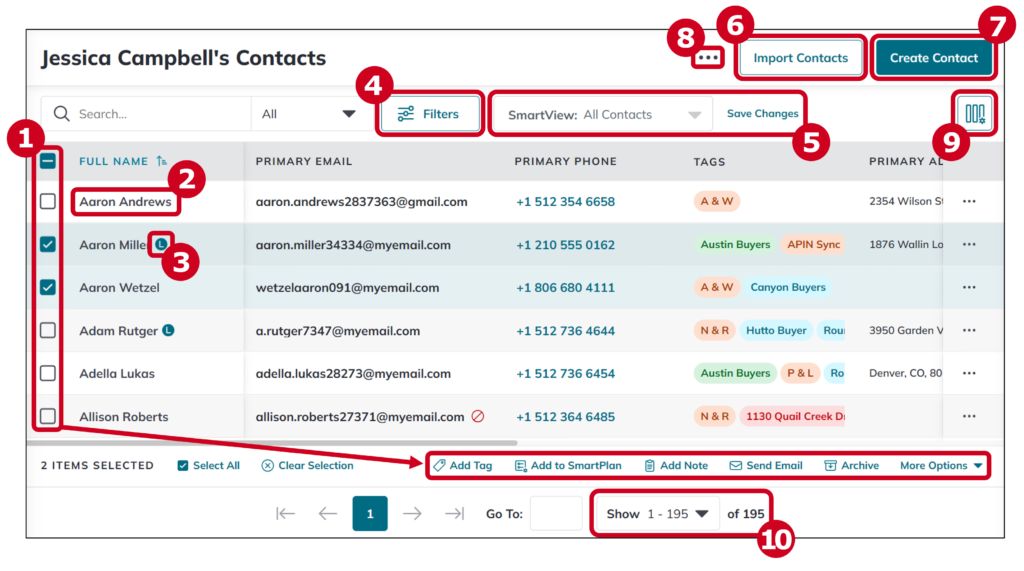
A strong real estate business begins with a healthy database, and Command KW places contact organization at the center of its system. Agents can:
- Add contacts manually, in bulk, or via integrations
- Assign tags, sources, and custom fields
- Track activity and engagement
- Attach saved searches and collections
- View a “database health score” based on completeness
- Monitor communication frequency through an activity score
Command automatically associates each lead with specific neighborhoods, allowing you to send hyperlocal market updates through SmartPlans.
SmartPlans & Automation
SmartPlans are one of the most widely used features in Keller Williams Command. They allow agents to automate follow-up and stay top of mind without having to manually send every email or reminder.
SmartPlans can include:
- Automated emails
- Scheduled phone call reminders
- Text messages
- App notifications
- Tasks for the agent
- Delays and drip sequences
Agents can use KW’s pre-built SmartPlans (such as Neighborhood Nurture, Quarterly Call, Open House Follow-up) or build completely custom ones. A SmartPlan Library also allows users to borrow plans created by other KW agents.
Opportunities (Pipeline & Deal Tracking)
The Opportunities tool is where agents oversee their entire sales pipeline. This section breaks deals into stages such as:
- Cultivate
- Appointment
- Active listing
- Under contract
- Closed
Agents can:
- Customize each pipeline stage
- Forecast revenue
- Track tasks tied to each step of the deal
- Compare offers
- Upload and manage documents
- Submit commissions to the Market Center
For many agents, this replaces spreadsheets and reduces the need for separate transaction software.
Tasks & Workflow Management
To help eliminate missed follow-ups, Command KW includes a task manager that syncs with SmartPlans, Opportunities, and your contact database. You can:
- Create manual tasks
- Snooze, reschedule, or mark tasks as complete
- Sync appointments via Google Calendar
- Filter tasks by day, week, or client
For agents juggling dozens of leads, this serves as a centralized to-do list tied directly to your pipeline.
Referrals & the KW Network
Because Keller Williams operates one of the largest real estate networks in the world, Command includes a robust referral system where agents can:
- Search referral partners using an interactive map
- Send and receive referrals
- Broadcast a referral to up to 50 agents
- Track referral status
- Build a preferred partner list
For agents looking to expand beyond their local market, this feature is especially valuable.
Listings & Virtual Tours
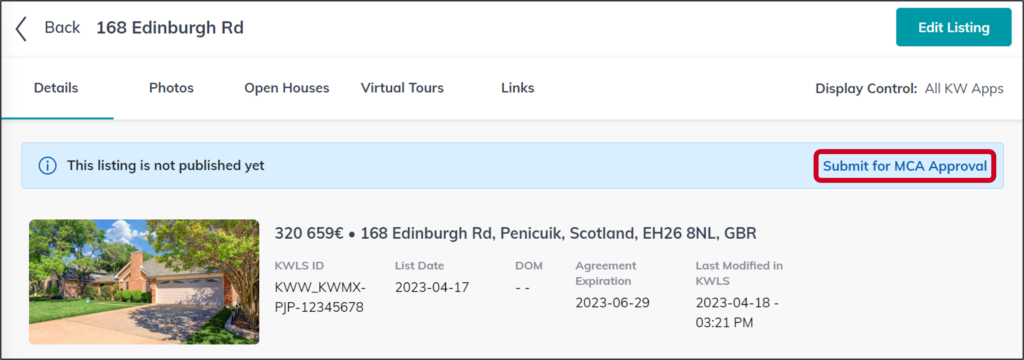
The Listings module provides an end-to-end hub for managing property listings. Agents can:
- View all active, pending, and sold listings
- Access neighborhood-level insights
- Upload photos, property details, and virtual tours
- Promote listings across multiple channels
- Sync MLS data to their KW Command website
Virtual tours created here appear on the agent’s Command site, KW.com, and the KW Consumer App.
Designs (Marketing Center)
Command’s Designs tool gives agents a library of templates they can customize for:
- Social media graphics
- Postcards
- Flyers
- Door hangers
- Listing presentations
- Email newsletters
- Landing pages
Instead of using Canva or third-party software, many agents prefer Designs because it automatically matches KW branding guidelines and syncs with listings.
Campaigns (Ads, Email, and Direct Mail)
KW Command allows agents to manage and launch paid and free marketing campaigns across multiple channels. Inside Campaigns, you can run:
- Facebook Ads
- Instagram Ads
- Google Ads
- Email campaigns
- Direct mail postcards
- Free social posts
KW reports that Command delivers leads at an average cost of $3 per lead, far lower than many competing platforms.
Reporting & Goal Tracking
Command KW includes built-in analytics to help agents evaluate performance, including:
- Lead activity
- SmartPlan engagement
- Pipeline projections
- Email open and click-through rates
- Contact database score
- Goal progress (listings, GCI, units closed)
These insights help agents adjust strategy and measure ROI.
Integrations
Keller Williams Command connects with several core real estate and marketing tools, including:
- DocuSign (document signatures)
- Dotloop
- Twilio (text messaging)
- MailChimp
- Facebook Ads Manager
- Google Calendar
- Zapier
These integrations allow Command to replace multiple standalone systems.
Command App & Consumer KW App
The Command App is the mobile version of the CRM, letting agents:
- Access contacts and pipelines
- Add notes
- Manage tasks
- Run SmartPlans
- Receive notifications
Meanwhile, the KW Consumer App lets clients:
- Save searches
- Browse homes
- Create collections
- Request showings
- Follow their buyer/seller guide steps
Both apps sync directly with Command in real time.
8 Benefits of Using KW Command
KW Command was designed to give Keller Williams agents an integrated, end-to-end platform that replaces the need for multiple outside tools.
While experiences vary, several advantages consistently stand out for users of Keller Williams Command.
All-in-One Platform for Real Estate Workflows
Agents who previously relied on a mix of spreadsheets, paid CRMs, email platforms, and ad managers often find Command KW appealing because it brings all of these workflows into one system:
- Contact and database management
- Lead routing and automation
- Task and pipeline tracking
- Transaction and document oversight
- Social media ads and email marketing
- Website pages and landing page creation
For agents who want fewer logins and more structure, this consolidation is one of the platform’s strongest benefits.
No Additional Cost for Keller Williams Agents
One of the biggest advantages of KW Command is cost. While many real estate CRMs charge $300–$1,000+ per month when you add advertising tools, text messaging, and templates, Command is included at no extra cost for Keller Williams agents.
This makes it a practical starting point for:
- New agents without a large budget
- Solo agents who want a complete system
- Teams trying to manage expenses
- Anyone seeking a full CRM without third-party pricing
For many, Command serves as a lower-cost alternative to popular platforms like kvCORE, BoomTown, or Chime.
Automations That Save Time and Improve Follow-Up
The automation capabilities in Keller Williams CRM (especially SmartPlans) help ensure leads don’t slip through the cracks. Agents can automatically:
- Send follow-up emails
- Trigger reminders for phone calls
- Text new prospects
- Launch listing-focused campaigns
- Deliver neighborhood updates
This reduces manual work and supports consistent communication, something many agents lack when relying on ad-hoc systems.
Connected Experience Between Agent & Consumer Apps
The relationship between the Command App and the KW Consumer App allows agents to see:
- Client searches
- Saved homes
- Collection activity
- Guide progress
- App engagement
This visibility helps agents prioritize who to follow up with and tailor conversations to each lead’s interests.
Access to the Largest Referral Network in Real Estate
Because Keller Williams maintains one of the biggest agent networks globally, Command KW gives users access to a map-based referral marketplace. Agents can:
- Search referral partners by geography
- Broadcast referrals to groups
- Track deal progress
- Build a referral network over time
For agents in relocation-heavy markets, this network can become a steady income source.
Marketing Tools That Reduce Dependency on Outside Platforms
The Designs and Campaigns tools allow agents to create polished marketing materials without purchasing separate software. Inside Command, users can:
- Build social media graphics
- Create flyers and postcards
- Run Facebook and Instagram ads
- Launch Google Ads
- Schedule free social posts
- Send email newsletters
The built-in templates help agents produce professional content faster and more consistently.
Business Planning, Reporting & Revenue Forecasting
The reporting features in Command KW help agents understand their business performance without relying on spreadsheets. The system tracks:
- Lead engagement
- Contact activity
- SmartPlan performance
- Pipeline volume
- Projected revenue
- Goal progress (units, GCI, listings, closings)
For agents who want more structure or clear income planning, this is a valuable tool.
Built With Agent Input
Unlike many CRMs built by software companies outside the industry, Keller Williams Command was created with input from:
- Agents
- Rainmakers
- Market Centers
- Regional leaders
- Data scientists
This agent-first approach helps align the platform with real-world real estate workflows.
Limitations & Common Pain Points of KW Command
While KW Command offers extensive features at no additional cost, it also comes with limitations that agents should understand before relying on it as their primary business system. Much of the feedback centers around setup, customization, and overall ease of use.
Steep Setup and Learning Curve
One of the most common challenges is the time required to set up Command KW properly. Out of the box, the platform feels bare and requires significant customization: importing contacts, building SmartPlans, organizing tags, setting up pipelines, and connecting integrations.
New agents often underestimate how much configuration is needed before Command becomes efficient.
For those who aren’t tech-savvy, the onboarding period can feel overwhelming, especially when compared to CRMs that offer more plug-and-play setups.
Limited Website Customization
KW Command includes an agent website, but customization options are minimal. There is only one basic template available, and many agents say their sites look similar since branding elements cannot be significantly altered.
Another limitation is the lack of built-in blogging or SEO tools. Agents who want to build organic traffic usually end up supplementing Command KW with a separate WordPress or real-estate-focused site. As a result, Command works well for lead capture pages but not for content-driven marketing strategies.
IDX Restrictions
Unlike full IDX websites, the Command KW site has constraints on how listings are displayed and how deeply you can customize search pages. For agents who want advanced property search features or hyperlocal content, the platform can feel restrictive. Landing pages tend to perform better than the main site, but even these have layout limitations.
Occasional Performance Issues
Several users report that Keller Williams Command can occasionally run slowly or lag when loading SmartPlans, pulling large contact lists, or updating Opportunities. While not universal, these issues can be frustrating for agents who rely on fast workflows.
Requires Ongoing Maintenance
Because Command is a powerful but hands-on system, agents need to maintain it regularly. Pipelines, tasks, tags, and SmartPlans need updating to stay useful. Contacts must be monitored to keep a healthy database score. For busy agents, this upkeep requires discipline and routine.
Marketing Tools Have Limits
The Designs and Campaigns tools are helpful and cost-effective, but they are not a full replacement for advanced marketing platforms.
Email campaigns have send minimums, social ads offer fewer targeting options than running ads directly through Facebook or Google, and customization within templates can feel limited for those with specific branding needs.
These limitations don’t negate the value of Command; rather, they highlight the areas where many agents supplement the system with outside tools or seek additional customization. For some, the trade-offs are minimal.
For others (especially those wanting full branding control or heavy SEO capabilities), Command may be only part of a larger tech stack.
KW Command vs Competing Real Estate CRMs
KW Command sits in a unique position within the real estate tech landscape. Unlike third-party CRMs built for any brokerage or team, Keller Williams Command is designed specifically for agents inside the KW ecosystem. That makes it more integrated than many competitors, but also less flexible for those who want deep customization or SEO-driven web tools.
Below is a neutral comparison of Command KW versus major CRM platforms used across the industry.
KW Command vs. kvCORE
kvCORE is often considered one of the closest functional comparisons to a brokerage-wide CRM. It’s widely used by large teams and offers a strong website, IDX tools, and a lead generation platform.
Where kvCORE excels:
- Built-in SEO-ready website with blogging
- Advanced behavioral automation and text messaging
- Strong property search and IDX features
- Better customization for branding and landing pages
- Works for any brokerage, not just KW
Where KW Command excels:
- No additional monthly fee for KW agents
- Simple workflow for SmartPlans and follow-up
- Direct integration with KW listings, referrals, and Market Centers
- Lower cost per lead when running ads
Best for:
- kvCORE: agents wanting strong SEO + IDX search
- KW Command: agents wanting lower cost and deeper KW integration
KW Command vs. Follow Up Boss
Follow Up Boss (FUB) is widely praised for speed, simplicity, and its ability to centralize leads from many sources. It’s often used by high-volume teams.
Where Follow Up Boss excels:
- Extremely fast, responsive CRM
- Excellent lead routing and team communication
- Deep integration with third-party systems
- Strong reporting and collaboration features
Where KW Command excels:
- Built-in marketing studio and design templates
- End-to-end transaction pipeline (Opportunities)
- Lower cost and tightly integrated with KW’s ecosystem
- Native SmartPlans that are easier for beginners
Best for:
- FUB: high-performing teams with large lead budgets
- Command KW: KW agents wanting a free, all-in-one system
KW Command vs. BoomTown
BoomTown is one of the most established platforms for real estate lead generation and team management.
Where BoomTown excels:
- Strong IDX website with comprehensive search tools
- Proven paid lead-generation system
- Separate coach-supported workflows for agents and ISAs
- More polished and consistent user experience
Where KW Command excels:
- No subscription cost
- Broader automation options without add-ons
- Full integration with Keller Williams referrals and listings
- Native mobile experience tied to the KW Consumer App
Best for:
- BoomTown: teams that rely heavily on paid traffic and need a turnkey system
- Command KW: agents who want to run ads, nurture leads, and track deals with minimal expenses
KW Command vs. Chime
Chime is a modern real estate CRM known for sleek design, AI-driven nurturing, and strong IDX features.
Where Chime excels:
- High-quality websites with strong SEO potential
- AI assistant for follow-up
- Powerful property search and landing pages
- Dynamic reporting tools
Where KW Command excels:
- Much lower cost
- Native SmartPlans are tied directly to Keller Williams-only workflows
- Full transaction, referral, and listing integration within the KW ecosystem
Best for:
- Chime: marketing-driven teams wanting AI-powered automation and SEO
- Keller Williams Command: agents looking for an economical, integrated solution
Where KW Command Stands Overall
Compared to most third-party platforms, Keller Williams Command is:
Stronger in:
- Cost efficiency
- KW ecosystem integration
- Lead management and automation
- All-in-one structure with no extra subscriptions
Weaker in:
- Website customization
- Search engine optimization
- Advanced IDX capabilities
- Speed and complexity for heavy power users
Because of this, many Keller Williams agents rely on KW Command for CRM + workflow, but supplement it with an external website for SEO and branding.
Conclusion
KW Command has become a central part of the Keller Williams ecosystem, offering agents a cost-effective, all-in-one platform for managing contacts, automation, marketing, and transaction workflows.
For many, it replaces multiple subscriptions and brings much-needed structure to daily operations. The tight integration with the KW Consumer App, referral network, and Market Center tools also makes Keller Williams Command valuable for agents who want everything in one place.
At the same time, Command isn’t perfect. The setup takes time, the website offers limited customization, and the CRM lacks strong SEO features found in some third-party platforms. Agents who need advanced branding, IDX capabilities, or a customizable website may still pair Command with additional tools.
As a real estate recruitment agency, we regularly speak with agents at all stages of their careers, and we understand how important the right technology is when choosing a brokerage.
The tools a company provides (particularly its CRM, marketing platform, and lead-nurture systems) can significantly impact an agent’s earning potential and long-term professional satisfaction.
KW Command is well-suited for agents who want structure, automation, and a cost-effective all-in-one system. Those who prioritize heavy customization, SEO, or a unique web presence may prefer a hybrid setup that combines Command with external marketing tools.
Used consistently and intentionally, Command KW can serve as a strong operational backbone for Keller Williams agents, and a meaningful factor for those evaluating whether the brokerage aligns with their business goals.